Showing posts with label AX2012. Show all posts

Monday, November 27, 2023

D365 FO Encryption And Decryption Using A Symmetric Key(AES) using X++


Encryption And Decryption Using A Symmetric Key(AES) using x++

 Encryption And Decryption Using A Symmetric Key(AES) using x++.


I received a requirement to generate an XML file with encrypted data using a symmetric key. The recipients on the other side will decrypt the text using the same symmetric key. To test this, I used a dummy value such as 'RRR'.

To achieve this, I wrote the code in C# and added the resulting DLL to my project references.


C# Code:

using System;
using System.IO;
using System.Security.Cryptography;
using System.Text;

namespace EncryptionDecryptionUsingSymmetricKey
{
    public class AesOperation
    {
        public static string EncryptString(string key, string plainText)
        {
            byte[] iv = new byte[16];
            byte[] array;

            using (Aes aes = Aes.Create())
            {
                aes.Key = Encoding.UTF8.GetBytes(key);
                aes.IV = iv;

                ICryptoTransform encryptor = aes.CreateEncryptor(aes.Key, aes.IV);

                using (MemoryStream memoryStream = new MemoryStream())
                {
                    using (CryptoStream cryptoStream = new CryptoStream((Stream)memoryStream, encryptor, CryptoStreamMode.Write))
                    {
                        using (StreamWriter streamWriter = new StreamWriter((Stream)cryptoStream))
                        {
                            streamWriter.Write(plainText);
                        }

                        array = memoryStream.ToArray();
                    }
                }
            }

            return Convert.ToBase64String(array);// It will convert bytes to string
        }

        public static string DecryptString(string key, string cipherText)
        {
            byte[] iv = new byte[16];
            byte[] buffer = Convert.FromBase64String(cipherText); // It will convert string to bytes
using (Aes aes = Aes.Create()) { aes.Key = Encoding.UTF8.GetBytes(key); aes.IV = iv; ICryptoTransform decryptor = aes.CreateDecryptor(aes.Key, aes.IV); using (MemoryStream memoryStream = new MemoryStream(buffer)) { using (CryptoStream cryptoStream = new CryptoStream((Stream)memoryStream, decryptor, CryptoStreamMode.Read)) { using (StreamReader streamReader = new StreamReader((Stream)cryptoStream)) { return streamReader.ReadToEnd(); } } } } } } }


X++ Code:

b14ca5898a4e4133bbce2ea2315a1916

Using EncryptionDecryptionUsingSymmetricKey;

internal final class TestRunnableClass1
{
    public static void main(Args _args)
    {
        str key = "b65ff7654brt8799fghj4ed7892b6798";
 
        str	text = 'RRR';
 
        str encryptedString = AesOperation::EncryptString(key, text);
 
        info(encryptedString);
 
        str decryptedString = AesOperation::DecryptString(key, encryptedString);
 
        info(decryptedString);
    }
}
References   Ref1  Ref2 


Saturday, October 22, 2022

D365 find Invent On Hand Value with X++

 D365 How to find Invent On Hand Value with X++ ?


To show on hand through D365 you can use On-hand list form from Inventory management >> Inquiries and Reports >> On-hand list


You can use Filter for your Item , and show Dimensions for more details 


Here You can check available Physical inventory qty, Available physical qty, Physical reserved qty ,Available physical on exact dimensions qty and Ordered in total qty


To get On-hand for item please find below the X++ code 
you can change parameters based on your business need 


 InventOnhand _InventOnhand;
        InventDimParm _InventDimParm;
        InventDim _InventDim;
        ItemId  itemid = "1030249-0174";

        _InventDim = null;
        _InventDim.InventSiteId  = "Main";
        _InventDim.InventLocationId = "X1";
        _InventDim.wMSLocationId = "ONM-ABQ-01";

        _InventDimParm.initFromInventDim(_InventDim);
        _InventOnhand = InventOnhand::newParameters(itemid , _InventDim , _InventDimParm);
        Info(strFmt("%1 , %2 , %3 , %4 : %5 " , 
            itemid ,  _InventDim.InventSiteId ,  _InventDim.InventLocationId , _InventDim.wMSLocationId
            , _InventOnhand.availPhysical()));


please find below the calculation for  _InventOnhand.availPhysical() 


Sunday, August 28, 2022

How to get calling menu name in extensions Dynamics 365 for finance and operations

 Today is small tip, Many times, we have to took decision based on the name of menu  on which form is called. By getting menu name we can use same form for different purposes.  We can write logic based on current form called from which menu item.

Following is the code snippet helps you to achieve this.

[FormEventHandler(formStr(LogisticsContactInfoGrid), FormEventType::Initialized)]
    public static void LogisticsContactInfoGrid_OnInitialized(xFormRun sender, FormEventArgs e)
    {
        FormRun formRun = sender;
        
        if (formRun.args().menuItemName() == "CustomerLogisticsContactInfoGrid")
        {
            FormDataSource      LogisticsElectronicAddress_ds =formRun.dataSource("LogisticsElectronicAddress");
            LogisticsElectronicAddress_ds.InsertIfEmpty(true);
            LogisticsElectronicAddress_ds.object(fieldNum(LogisticsElectronicAddress, Locator)).mandatory(true);
        }
}
Ref

Sunday, July 3, 2022

D365FO & AX 2012 - Data Source Join Types

 For Instance, We Created Two Tables.


  • Student
  • Student Attendance


Then Create a relation as per your requirement. I am using Normal relations.

Student

Student Attendance


Now create New Form and Add two Gird [StudentGrid] & [StudentAttendanceGird]


Let's begin


Passive Join Type


Passive form data source link type won't update the child data source automatically. For example, if we select the parent table order then order details child data source won't update. If we need to update the child data source we need to call the child data source to execute the query method by the program (code).


Active Join Type


Active link type updates the child data sources without any delay when you select the parent table record. When you deal with more records it will affect application performance.

Delay Join Type


Delay form data source link type is also same as active method the different is delay method won't update immediately when you select the parent record. It will update the child data source when you select the parent table, Ax uses a pause statement before update the child data source. 


Inner join Type


Inner join form data source link type displays the rows that match with parent table and child table. 


Outer join Type


Outer join form data source link type will return all parent records and matched child records. It will return all rows in the parent table. 

Exists Join Type


Exist join form data source link type return matched rows of the parent table. It behaves like an inner join but the difference is once the parent row is matched with child records then stops the process and updates in the grid, Ax won't consider how many records are in the child table for the parent row.

Not Exists Join Type


Not exist join form data source link type is a totally opposite method to exist join. It will return the not-matched parent records with child records.

Sunday, June 19, 2022

X++ Dynamics date2Str Function - Converts the specified date to a string

 To use the date format that the user specified in Regional Settings, use the strFmt or date2Str function with -1 in all the formatting parameters. When the regional settings control the date format, the settings can change from user to user. If -1 is used for either separator parameter, both separators default to Regional Settings.

The sequence parameter values must be any three digit number that contains exactly one occurrence of each digit 1, 2 and 3. The digits 1-2-3 represent day-month-year respectively. For example, 321 would produce the sequence of year, month, and day. Or the value can be -1 to use Regional Settings. No enumeration type should be used for this parameter, because numbers like 321 exceed the range of valid values for enumeration values, which is 0 through 250 inclusive.

The default value of the Flags parameter is the DateFlags::None enumeration value, which means no left-to-right or right-to-left sequence processing is performed.

Here is the description of the function and also a couple of examples on how to implement.


str date2Str( date date, int sequence, int day, int separator1, int month, int separator2, int year [, int flags = DateFlags::None])

Parameter
Description
date
The date to convert.
sequence
A three digit number that indicates the sequence for the components of the date, 1 for day, 2 for month, and 3 for year.
day
DateDay enumeration value that indicates the format for the day component of the date.
separator1
DateSeparator enumeration value that indicates the separator to use between the first two components of the date.
month
DateMonth enumeration value that indicates the format for the month component of the date.
separator2
DateSeparator enumeration value that indicates the separator to use between the last two components of the date.
year
DateYear enumeration value that indicates the format for the year component of the date.
flags
DateFlags enumeration value that indicates whether the language settings on the local computer should be used to calculate the proper left-to-right or right-to-left sequence in the returned string.
{
    date currentDate = today();
    str s;
    int iEnum;
    ;
    s = date2Str
        (currentDate,
        321,
        DateDay::Digits2,

        DateSeparator::Hyphen, // separator1
        DateMonth::Digits2,
        DateSeparator::Hyphen, // separator2

        DateYear::Digits4
        );
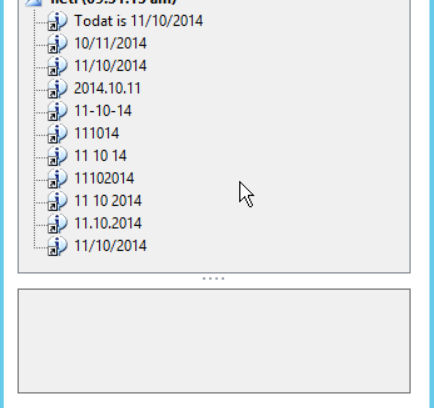
    info("Today is:  " + s);
}
/** Example Infolog output
Message (12:36:21 pm)
Today is:  2009-01-13
**/


sstatic void Job1(Args _args)
{
    date dateformat;
    str strformat,strformat2,strformat3,strformat4,strformat5,strformat6,strformat7,strformat8,strformat9,strformat10,strformat11;
    ;
    dateformat = today();
    info(strFmt("Todat is %1",dateformat));
    strformat = date2str(dateformat,123,DateDay::Digits2,DateSeparator::Slash,DateMonth::Digits2,DateSeparator::Slash,DateYear::Digits4);
    strformat2 = date2str(dateformat,213,DateDay::Digits2,DateSeparator::Slash,DateMonth::Digits2,DateSeparator::Slash,DateYear::Digits4);
    strformat3 = date2str(dateformat,312,DateDay::Digits2,DateSeparator::Dot,DateMonth::Digits2,DateSeparator::Dot,DateYear::Digits4);
    strformat4 = date2str(dateformat,213,DateDay::Digits2,DateSeparator::Hyphen,DateMonth::Digits2,DateSeparator::Hyphen,DateYear::Digits2);
    strformat5 = date2str(dateformat,213,DateDay::Digits2,DateSeparator::None,DateMonth::Digits2,DateSeparator::None,DateYear::Digits2);
    strformat6 = date2str(dateformat,213,DateDay::Digits2,DateSeparator::Space,DateMonth::Digits2,DateSeparator::Space,DateYear::Digits2);
    strformat7 = date2str(dateformat,213,DateDay::Digits2,DateSeparator::Dot,DateMonth::Digits2,DateSeparator::Dot,DateYear::Digits2);
    strformat8 = date2str(dateformat,213,DateDay::Digits2,DateSeparator::None,DateMonth::Digits2,DateSeparator::None,DateYear::Digits4);
    strformat9 = date2str(dateformat,213,DateDay::Digits2,DateSeparator::Space,DateMonth::Digits2,DateSeparator::Space,DateYear::Digits4);
    strformat10 = date2str(dateformat,213,DateDay::Digits2,DateSeparator::Dot,DateMonth::Digits2,DateSeparator::Dot,DateYear::Digits4);
    strformat11 = date2str(dateformat,213,DateDay::Digits2,DateSeparator::Slash,DateMonth::Digits2,DateSeparator::Slash,DateYear::Digits4);
 
    info(strFmt("%1",strformat));
    info(strFmt("%1",strformat2));
    info(strFmt("%1",strformat3));
    info(strFmt("%1",strformat4));
    info(strFmt("%1",strformat5));
    info(strFmt("%1",strformat6));
    info(strFmt("%1",strformat8));
    info(strFmt("%1",strformat9));
    info(strFmt("%1",strformat10));
    info(strFmt("%1",strformat11));
}

Tuesday, June 7, 2022

AX 2012: Create a Simple Batch Job

 AX 2012: Create a Simple Batch Job

In this post we’ll learn how to create a very basic custom Batch job using SysOperation framework. We’ll use the base controller class SysOperationServiceController and develop a custom service operation class to achieve the goal.

Requirement:

To create a Batch job to mark all the records as processed in a custom table MAKSalesTable.

Project overview:

The project shows how simple yet powerful the SysOperation framework is for developing custom batch jobs as opposed to RunBase framework since the minimum development needed to create a fully functional batch job is to create a custom service operation class defining a single method giving the implementation for the batch operation to be performed.

Development steps:

1. Create a service operation class MAKSalesTableService having the following class declaration:

class MAKSalesTableService
{
}

2. Create a new method in the class giving a suitable name like processRecords having the following definition:

[SysEntryPointAttribute(false)]
public void processRecords()
{
    MAKSalesTable   makSalesTable;
    int             counter = 0;

    //Determines the runtime
    if (xSession::isCLRSession())
    {
        info('Running in a CLR session.');
    }
    else
    {
        info('Running in an interpreter session.');

        //Determines the tier
        if (isRunningOnServer())
        {
            info('Running on the AOS.');
        }
        else
        {
            info('Running on the Client.');
        }
    }

    //Actual operation performed
    while select forUpdate makSalesTable
    {
        ttsBegin;
        makSalesTable.Processed = NoYes::Yes;
        makSalesTable.update();
        ttsCommit;

        counter++;
    }

    info(strFmt("Successfully processed %1 records.", counter));
}

3. Create an action menu item MAKSalesTableService pointing to SysOperationServiceController.

4. Set the parameters of the action menu item to the service operation just created, MAKSalesTableService.processRecords.

image

5. Compile the service operation class and generate incremental IL.

6. Click on the action menu item to run the batch job. Check the Batch processing checkbox to run the job in CLR runtime which is the batch server execution environment.

image

image

7. Click System administration > Inquiries > Batch jobs to view the status of the job. You may also click on the Log button to view the messages written to infolog during the job execution.

image

image

Preconditions:

Before running the batch job, all the records were unprocessed:

image

Post conditions:

After running the batch job, the list page shows that all the records are now marked as processed:

image


Using X++ : Export Data from table to a CSV File

X++ : Export Data from table to a CSV File

 CSV file itself doesn't contain any formatting information. You can verify this by opening the file in Notepad - you will see the values displayed correctly. When you open CSV in Excel, you can let Excel automatically determine the column data types, or you can define them yourself.


static void SF_ExportToCSVFile(Args _args)

{

    TextBuffer              textBuffer  = new TextBuffer();

    InventTable             inventTable;

    FileIoPermission        perm;

    counter                 Lines;


    #define.ExampleFile(@"c:\test\test.csv")

    #define.ExampleOpenMode("W")


;

    try

    {

        // Set code access permission to help protect the use of

        perm = new FileIoPermission(#ExampleFile, #ExampleOpenMode);

        perm.assert();

        textBuffer.appendText("Item Id,");//must be "," suffix

        textBuffer.appendText("Item Name,");//must be "," suffix

        textBuffer.appendText("Item Type");

        textBuffer.appendText("\n");//next line must be "\n" suffix


        while select InventTable

            where   inventTable.ItemId like "04-1*"

        {

            textBuffer.appendText(strfmt("%1,",inventTable.ItemId));

            //must be repace "," to ""

            textBuffer.appendText(strfmt("%1,",global::strReplace(inventTable.itemName(),",","")));

            textBuffer.appendText(enum2str(inventTable.ItemType));

            textBuffer.appendText("\n");

        }

        Lines = textBuffer.numLines();

        try

        {

            if (textBuffer.toFile(#ExampleFile))

                info( strfmt("File Generated as %1.total insert %2 Lines",#ExampleFile,Lines-1));

        }

        catch ( Exception::Error )

        {

            error ("Generated file error.");

        }

        // Close the code access permission scope.

        CodeAccessPermission::revertAssert();

    }

    catch (Exception::Deadlock)

    {

        retry;

    }

}


Upload file to FTP X++


Upload file to FTP  X++

One of a very common requirements for any ERP systems is to have FTP file upload support to upload files from AX to FTP server. We do have many libraries, tools available to do that. However, it is best to have native X++ code without referencing any DLLs to upload your files to FTP from AX. Following code shows the example of uploading files to FTP.

The code written below can be easily used to upload files, However, if you have to process this as a batch you need to consider that batch runs on server/CIL and for this you need to set permissions and also if that still doesn't work, you can change the method to static server.
The File Transfer Protocol (FTP) is a standard network protocol used to transfer computer files between a client and server on a computer network but in our case, transfers file from AX client to file directory present on FTP server. You can easily find the code on the web on how to upload a file to FTP through X++ code but not in detail. In this post, I will try to explain detail about each line what it does during execution. So, let’s start.

static void SF_FTPJob(Args _args)
{
 System.Object ftpo;
   System.Object ftpResponse;
   System.Net.FtpWebRequest request;
   System.IO.StreamReader reader;
   System.IO.Stream requestStream;
   System.Byte[] bytes;
   System.Net.NetworkCredential credential;
   System.String xmlContent;
   System.Text.Encoding utf8;
   System.Net.FtpWebResponse response;
   ;
   // Read file
   reader = new System.IO.StreamReader(@'C:\test\testfileFTPAX.txt');
   utf8 = System.Text.Encoding::get_UTF8();
   bytes = utf8.GetBytes( reader.ReadToEnd() );
    //info(strFmt("%1",any2str(bytes)));
   reader.Close();
   // little workaround to get around the casting in .NET
   ftpo = System.Net.WebRequest::Create("ftp://IP:Port/FolderName/testfileFTPAX.txt");
   request = ftpo;

   credential = new System.Net.NetworkCredential("UserID","Password");
   request.set_Credentials(credential);
   request.set_ContentLength(bytes.get_Length());
   request.set_Method("STOR");
 
   requestStream = request.GetRequestStream();
   requestStream.Write(bytes,0,bytes.get_Length());
   requestStream.Close();

   ftpResponse = request.GetResponse();
   response = ftpResponse;

   info(response.get_StatusDescription());
}