Showing posts with label SSRS. Show all posts

Wednesday, July 24, 2024

D365 Sending Email with Customer Account Statement SSRS report as attachment using X++

D365 Sending Email with Customer Account Statement SSRS report as attachment using X++


 custTable _custTable;
              

                SysOperationQueryDataContractInfo sysOperationQueryDataContractInfo;
                SrsReportRunController reportRunController;
                CustTransListContract custTransListContract;
                SRSReportExecutionInfo reportExecutionInfo;
                SRSPrintDestinationSettings printDestinationSettings;
                SRSReportRunService srsReportRunService;
                SRSProxy srsProxy;
                QueryBuildRange qbrCustAccount;
                QueryBuildDataSource queryBuildDataSource;
                Object dataContractInfoObject;
                Map reportParametersMap;
                Map mapCustAccount;
                MapEnumerator mapEnumerator;
                Array arrayFiles;
                System.Byte[] reportBytes;
                Filename fileName;
                Args args;
                System.IO.MemoryStream memoryStream;
                System.IO.MemoryStream fileStream;
                CustParameters custParameters;
                Email toEmail;


                Map                                 templateTokens;
                str                                 emailSenderName;
                str                                 emailSenderAddr;
                str                                 emailSubject;
                str                                 emailBody;
 
                Microsoft.Dynamics.AX.Framework.Reporting.Shared.ReportingService.ParameterValue[]  parameterValueArray;
 
                #define.Subject("Subject")
                #define.CustAccount("CustAccount")
                #define.EmailDate("Date");
 
                custParameters          = CustParameters::find();
 
                reportRunController     = new SrsReportRunController();
                custTransListContract   = new CustTransListContract();
                reportExecutionInfo     = new SRSReportExecutionInfo();
                srsReportRunService     = new SrsReportRunService();
                reportBytes             = new System.Byte[0]();
                args                    = new Args();
                templateTokens          = new Map(Types::String, Types::String);
                var messageBuilder      = new SysMailerMessageBuilder();
 
                // custTransListContract.parmNewPage(NoYes::Yes);
                str custAccount = "10000";
                _custTable = CustTable::find(custAccount);
                if(!_custTable)
                {
                    return "No Customer found";
                }
                if(!emailAddress)
                {
                    return "No emailAddress";
                }
                fileName    = strFmt("CustomerAccountStatement_%1.pdf", _custTable.AccountNum);
 
                reportRunController.parmArgs(args);
                reportRunController.parmReportName(ssrsReportStr(CustTransList, Report));
                reportRunController.parmShowDialog(false);
                reportRunController.parmLoadFromSysLastValue(false);
                reportRunController.parmReportContract().parmRdpContract(custTransListContract);
 
                // Modify query
                mapCustAccount = reportRunController.getDataContractInfoObjects();
                mapEnumerator = mapCustAccount.getEnumerator();
 
                while (mapEnumerator.moveNext())
                {
                    dataContractInfoObject = mapEnumerator.currentValue();
 
                    if (dataContractInfoObject is SysOperationQueryDataContractInfo)
                    {
                        sysOperationQueryDataContractInfo = dataContractInfoObject;
 
                        queryBuildDataSource    = SysQuery::findOrCreateDataSource(sysOperationQueryDataContractInfo.parmQuery()
                                                                    , tableNum(CustTable));
                        qbrCustAccount          = SysQuery::findOrCreateRange(queryBuildDataSource, fieldNum(CustTable, AccountNum));
                        qbrCustAccount.value(_custTable.AccountNum);
                    }
                }
 
                printDestinationSettings = reportRunController.parmReportContract().parmPrintSettings();
                printDestinationSettings.printMediumType(SRSPrintMediumType::File);
                printDestinationSettings.fileName(fileName);
                printDestinationSettings.fileFormat(SRSReportFileFormat::PDF);
 
                reportRunController.parmReportContract().parmReportServerConfig(SRSConfiguration::getDefaultServerConfiguration());
                reportRunController.parmReportContract().parmReportExecutionInfo(reportExecutionInfo);
 
                srsReportRunService.getReportDataContract(reportRunController.parmreportcontract().parmReportName());
                srsReportRunService.preRunReport(reportRunController.parmreportcontract());
 
                reportParametersMap = srsReportRunService.createParamMapFromContract(reportRunController.parmReportContract());
                parameterValueArray = SrsReportRunUtil::getParameterValueArray(reportParametersMap);
 
                srsProxy        = SRSProxy::constructWithConfiguration(reportRunController.parmReportContract().parmReportServerConfig());
                reportBytes     = srsproxy.renderReportToByteArray(reportRunController.parmreportcontract().parmreportpath()
                                                    , parameterValueArray
                                                    , printDestinationSettings.fileFormat()
                                                    , printDestinationSettings.deviceinfo());
 
                memoryStream    = new System.IO.MemoryStream(reportBytes);
                memoryStream.Position = 0;
 
                fileStream      = memoryStream;
                toEmail         =  this.getCustEmail(_custTable.AccountNum);


                    emailBody = "Dear Customr, Please find attached Customer account statement till today.";
                    emailSubject = strFmt("Customer account statement for %1", _custTable.AccountNum);
                    emailSenderAddr = "msd@test.com";
                    emailSenderName = strFmt("Customer account statement for %1", _custTable.AccountNum);


                    messageBuilder.addTo(toEmail)
                        .setSubject(emailSubject)
                        .setBody(SysEmailMessage::stringExpand(emailBody, SysEmailTable::htmlEncodeParameters(templateTokens))).addCC("");
 
                 
                    messageBuilder.setFrom(emailSenderAddr , emailSenderName );
           
                    messageBuilder.addAttachment(fileStream, fileName);
 
                    SysMailerFactory::sendNonInteractive(messageBuilder.getMessage());


public Email getCustEmail(CustAccount _custAccount)
{
    CustTable                   custTable;
    DirPartyLocation            dirPartyLocation;
    LogisticsLocation           logisticsLocation;
    LogisticsElectronicAddress  logisticsElectronicAddress;
 
    custTable = CustTable::find(_custAccount);
 
    select firstonly Location, Party from dirPartyLocation
        where dirPartyLocation.Party                        == custTable.Party
            join RecId from logisticsLocation
                where logisticsLocation.RecId               == dirPartyLocation.Location
            join Locator from logisticsElectronicAddress
                where logisticsElectronicAddress.Location   == logisticsLocation.RecId
                    && logisticsElectronicAddress.Type      == LogisticsElectronicAddressMethodType::Email
                    && logisticsElectronicAddress.IsPrimary == NoYes::Yes;
 
    return logisticsElectronicAddress.Locator;
}

Monday, November 20, 2023

D365 Solution for Cloud Dev machine show error ' The remote certificate is invalid according to the validation procedure. '


You are getting 'The remote certificate is invalid according to the validation procedure.'Error show with all reports and  tired Rotate SSL Certificate but not complete.


will require applying the below steps and if still the same issue after this so you will need to redeploy this environment.
  1. Navigate to Lifecycle Services.

  2. In the Shared Asset library, click the Model

  3. Download the Renew WinRM certificate folder

  4. RDP to the environment

  5. Extract the zip file to a local folder

  6. Open mmc.exe and add Certificate snap-in (Computer)

  7. Open Personal\Certificates and locate the certificate with your VMs name which should have the expiration date passed

  8. Browse to the RenewWinRMCertificate folder that was previously created from extracting the zip file

  9. Select File > Open Windows PowerShell with elevated privileges (Run as Administrator)

  10. Run .\VirtualMachine-RegenerateWinRMCertificate.ps1 from the folder

  11. Refresh the Certificates console and confirm the Certificate has been created and the expiration date is now valid. (Optional: Delete expired certificate to avoid confusion)

  12. Restart the Environment from LCS (Stop \ Start)

  13. In LCS select Maintain > Rotate secrets

  14. Select 'Rotate the SSL certificates'

How to update the WinRM SSL certificate on environments deployed in your subscription - Microsoft Dynamics 365 Blog

Rotate the expired or nearly expired SSL certificate on your subscription's one-box environments - Microsoft Dynamics 365 Blog


in case when running step number 10  (Run .\VirtualMachine-RegenerateWinRMCertificate.ps1 from the folder ) and show below error 


1: Configure Network Security Rules>Go to Network Security Group of the Azure VM and change 'powershell-remote-rule' from Deny to Allow (this is just temporary; we will change it back after completing the rotation). 

Then run script It should work fine.


Tuesday, May 2, 2023

D365 FO Computed column in View ( Returning Field in View )

The technique to add a computed column begins with you adding a static method to the view. The method must return a string. The system automatically concatenates the returned string with other strings that the system generates to form an entire T-SQL create view statement.

The method that you add to the view typically has at least one call to the DictView.computedColumnString method. The parameters into the computedColumnString method include the name of a data source on the view, and one field name from that data source. The computedColumnString method returns the name of the field after qualifying the name with the alias of the associated table. For example, if the computedColumnString method is given the field name of AccountNum, it returns a string such as A.AccountNum or B.AccountNum. 

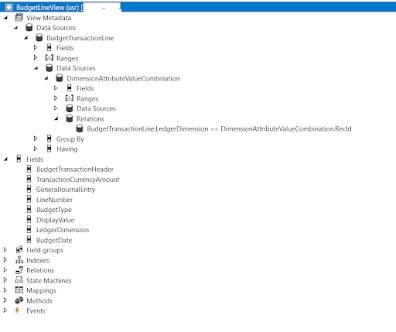
1 - Create Your View 


2- Add a Static Method to the View 
  The code below 

3 - Add Computed column 


Here is an example which illustrates how can we add computed columns to return Year , Month and substring from field in view 


private static server str ProjectID()

    {

        #define.CompView(SG_BudgetLineView)

        #define.CompDS(DimensionAttributeValueCombination)

        #define.DisplayValue(DisplayValue)


        str LedgerAccount;

        LedgerAccount =  return SysComputedColumn::returnField(tableStr(#CompView), identifierStr(#CompDS), fieldStr(#CompDS, #DisplayValue));

        return "SUBSTRING(" + LedgerAccount + ", 10 , 5)";

    }

 private static server str Year()

    {

        str yearId;

        yearId = SysComputedColumn::returnField(identifierStr("BudgetLineView"),identifierStr("BudgetTransactionLine"),identifierStr("Date"));


        return "YEAR(" + yearId + ")";

    }


   private static server str Month()
    {
        str MonthId;
        MonthId = SysComputedColumn::returnField(identifierStr("BudgetLineView"),identifierStr("BudgetTransactionLine"),identifierStr("Date"));
        return "Month(" + MonthId + ")";
        // return "mthOfYr(" + MonthId + ")";
    }

    private static server str MainAccountID()
    {
        str LedgerAccount;
        LedgerAccount = SysComputedColumn::returnField(identifierStr("SG_BudgetLineView"),identifierStr("DimensionAttributeValueCombination"),identifierStr("DisplayValue"));

        return "SUBSTRING(" + LedgerAccount + ", 0 , 9)";
    }

  Computed column; Multiplying two coulmns and returning resultant from View

private static server str compTotalCostPrice()
{
#define.CompView(SWProjForecastCost)
   #define.CompDS(ProjForecastCost)
   #define.QtyCol(Qty)
#define.PriceCol(CostPrice)


   return SysComputedColumn::multiply(
SysComputedColumn::returnField(
tableStr(#CompView),
identifierStr(#CompDS),
fieldStr(#CompDS, #PriceCol)
          ),
SysComputedColumn::returnField(
tableStr(#CompView),
identifierStr(#CompDS),
fieldStr(#CompDS, #QtyCol)
           )
        );
}

Computed column; Returning Enum Value in View
public static server str compGeneralTransType()
{
   return SysComputedColumn::returnLiteral(Transaction::ProjectInvoice);
}

Computed column; Returning Field in View
public static server str compAmount()
{
#define.CompView(SWProjForecastCost)
#define.CompDS(ProjForecastCost)
#define.CostPrice(CostPrice)


   return SysComputedColumn::returnField(tableStr(#CompView), identifierStr(#CompDS), fieldStr(#CompDS, #CostPrice));
}


Computed column; Case Statement in View
public static server str TransType()
{
#define.CompDS(ProjForecastCost)
#define.CompView(SWProjForecastCost)
   str ret;

   str ModelId = SysComputedColumn::returnField(identifierStr(SWProjForecastCost), identifierStr(ProjForecastCost), identifierStr(ModelId));

   ret = "case " + modelId +
         " when 'Sales' then 'Forecast Sales' " +
         " when 'Orders' then 'Forecast Orders' " +
         " when 'Latest' then 'Forecast Latest' " +
         " end";
   return ret;


}
Case Statement for this view looks like in SQL server as below;

   CASE T2.MODELID
      WHEN 'Sales' THEN 'Forecast Sales'
      WHEN 'Orders' THEN 'Forecast Orders'
      WHEN 'Latest' THEN 'Forecast Latest' END